
Caching Explained: Page, Object, Browser & Server-Level
What is Caching? (Simple Explanation)
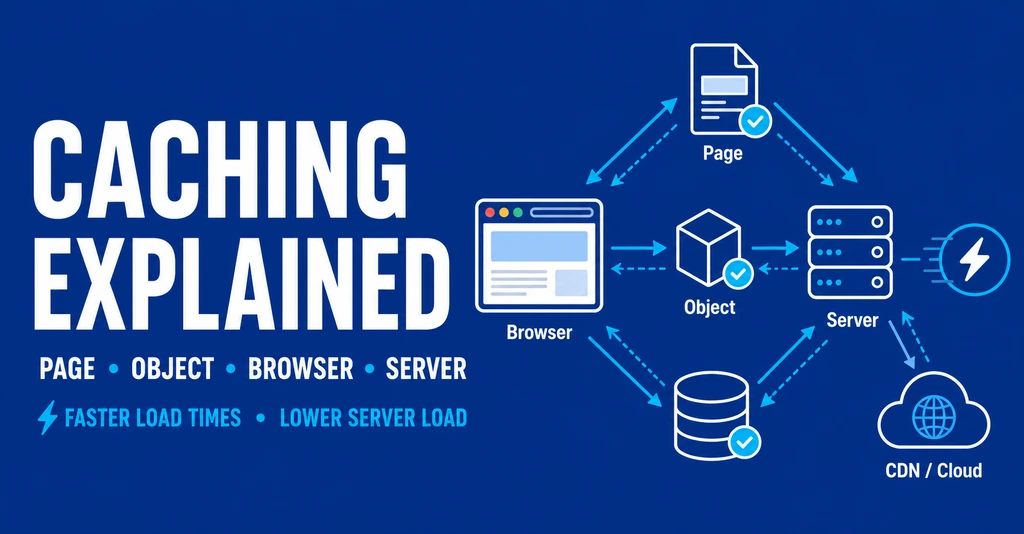
Caching is the process of storing frequently accessed data temporarily so it can be delivered faster on future requests.
Instead of generating a page or fetching data repeatedly, caching allows your server or browser to serve a pre-saved version, reducing load time and server strain.
If you’re new to performance optimization, start with Website Performance Explained
Table of Contents
Why Caching is Critical for Website Performance
Caching directly impacts:
- Page load speed
- Server response time (TTFB)
- Core Web Vitals (LCP, INP)
- Hosting resource usage
- SEO rankings
Without caching, every visitor request triggers:
- Database queries
- PHP execution
- API calls
With caching, most of that is skipped.
Learn how this affects rankings in Core Web Vitals Guide
How Caching Works (Step-by-Step Flow)
- User visits a webpage
- Server generates the page (first time)
- A cached version is stored
- Next visitors receive the cached version instantly
- Cache refreshes periodically or on updates
Deep dive into request flow: How Websites Work (/how-websites-work/)
For a technical breakdown, refer to Google’s official caching documentation.
Types of Caching (Complete Breakdown)
This hub connects all major caching types used in modern websites.
1. Page Caching (Full Page Cache)
What it Does
Stores the entire HTML output of a page.
Best For
- Blogs
- Static pages
- Landing pages
Benefits
- Massive speed boost
- Reduces server processing
- Improves TTFB significantly
Example
Instead of generating a WordPress page dynamically, the server serves a ready-made HTML file.
Implementation guide: Best Caching Plugins WordPress
2. Object Caching (Database-Level Caching)
What it Does
Stores database query results (objects) to avoid repeated database calls.
Best For
- Dynamic websites
- E-commerce (WooCommerce)
- Membership sites
Tools
- Redis
- Memcached
Benefits
- Reduces database load
- Speeds up backend operations
- Essential for scaling
Related optimization: WordPress Database Optimization
3. Browser Caching (Client-Side Caching)
What it Does
Stores static files (CSS, JS, images) in the user’s browser.
Example
When a user revisits your site, files load from their device instead of server.
Benefits
- Faster repeat visits
- Reduced bandwidth usage
- Improved user experience
Controlled By
- Cache-Control headers
- Expires headers
Learn more: Image Optimization Guide
4. Server-Level Caching
What it Does
Caching handled directly at the server level (before WordPress or app loads).
Types
- NGINX FastCGI Cache
- LiteSpeed Cache
- Varnish Cache
Benefits
- Fastest caching method
- Bypasses application layer
- Ideal for high-traffic sites
Hosting impact explained in Web Hosting Speed Impact
5. CDN Caching (Edge Caching)
What it Does
Caches content on servers worldwide (edge locations).
Benefits
- Faster global delivery
- Reduced origin server load
- Better uptime and scalability
Full explanation: What is a CDN?
Comparison: Different Types of Caching
| Cache Type | Level | Speed Impact | Best Use Case |
|---|---|---|---|
| Page Cache | Server/App | Very High | Blogs, static sites |
| Object Cache | Database | High | Dynamic websites |
| Browser Cache | Client | Medium | Returning visitors |
| Server Cache | Server | Extreme | High traffic sites |
| CDN Cache | Network | Extreme | Global audiences |
How All Caching Layers Work Together
Modern websites don’t use just one type—they stack caching layers:
- Browser cache handles repeat visits
- CDN delivers global assets
- Server cache handles requests
- Page cache serves HTML
- Object cache speeds up database
This layered approach creates maximum performance efficiency.
Learn full architecture: WordPress Speed Optimization Guide
Common Caching Mistakes (Critical)
1. Over-Caching Dynamic Content
- Breaks login/cart functionality
2. Not Clearing Cache After Updates
- Shows outdated content
3. Ignoring Object Cache
- Causes database bottlenecks
4. Using Too Many Caching Plugins
- Conflicts and instability
Avoid these in SEO Mistakes Fix
Best Caching Setup (Practical Strategy)
For Beginners (Shared Hosting)
- Page caching plugin
- Browser caching enabled
For Intermediate
- Page cache + Object cache
- CDN integration
For Advanced (High Traffic)
- Server-level caching
- Redis object cache
- CDN + edge caching
Hosting recommendation (affiliate):
Disclosure: These are referral links and do not cost you extra.
Caching + Core Web Vitals Impact
Caching improves:
- LCP (Largest Contentful Paint) → Faster page rendering
- INP (Interaction to Next Paint) → Reduced processing delay
- TTFB (Time to First Byte) → Instant server response
Detailed metrics: Core Web Vitals Guide
When You Should NOT Use Aggressive Caching
Avoid or limit caching on:
- Checkout pages
- User dashboards
- Real-time data apps
- Personalized content pages
Frequently Asked Questions (FAQs)
1. What is caching in simple words?
Caching is the process of storing frequently used data temporarily so it can be delivered faster instead of generating it again.
2. What are the main types of caching?
The main types are:
- Page caching
- Object caching
- Browser caching
- Server-level caching
- CDN caching
3. Which caching type is the fastest?
Server-level caching (like LiteSpeed or NGINX FastCGI) is the fastest because it bypasses application processing completely.
4. Is caching good for SEO?
Yes, caching improves page speed, which directly impacts Core Web Vitals and search rankings.
5. Do I need multiple caching types?
Yes. The best performance comes from combining:
- Browser cache
- Page cache
- Object cache
- CDN
6. When should caching be avoided?
Avoid aggressive caching on:
- Login pages
- Checkout pages
- Dynamic user dashboards
Final Takeaway
Caching is not optional—it is the foundation of website performance.
A properly configured caching system:
- Reduces load time drastically
- Saves hosting resources
- Improves SEO rankings
- Enhances user experience
The best results come from combining multiple caching layers strategically.
Conclusion
Caching is one of the most powerful yet misunderstood aspects of website performance. Instead of relying on a single method, the real advantage comes from combining multiple caching layers strategically.
From browser caching for repeat visitors to server-level caching for instant responses, each layer plays a critical role in reducing load time and improving efficiency.
If your goal is better Core Web Vitals, improved SEO rankings, and lower server load, then implementing a proper caching strategy is not optional—it is essential.
Start simple, then scale your caching stack as your traffic grows.